Before sending a crown case, a clean digital scan can make a big difference. Small issues like unclear margins, missing bite data, poor reduction, or incomplete shade notes can delay lab acceptance and create unnecessary back-and-forth.
This 5-minute digital scan checklist helps dentists quickly review the most important details before submitting a crown case: clear margin, enough reduction, adjacent teeth, accurate bite scan, and complete shade, photos, and notes.
For dentists across Florida and the United States, this simple checklist can help send cleaner scans, avoid delays, and support faster digital crown workflows with Palm Beach Dental Lab.
Why a 5-Minute Digital Scan Checklist Can Save the Whole Crown Case
A 5-minute digital scan checklist helps dentists catch small scan problems before they become lab delays. The most common issues are unclear margins, incomplete adjacent teeth, poor bite alignment, missing shade details, and scan artifacts near the preparation. When these are corrected chairside, the lab can accept and design the case faster, with less need for clarification or a rescan.
Digital workflows are fast, but they are not magic. The lab can only design from what the scan clearly captures.
For a single crown case, the lab needs enough information to understand:
- Where the crown margin starts and ends
- How much restorative space is available
- How the crown should contact adjacent teeth
- How the restoration should meet the opposing arch
- What shade and esthetic expectations matter clinically
If one of those pieces is unclear, the lab may need to pause the case. That creates the thing every dentist wants to avoid: a patient waiting, a team member answering lab questions, and a restoration that may need extra adjustment later.
A good crown case digital scan checklist protects both sides of the workflow. Dentists send better data. The lab starts faster. The patient gets a more predictable crown appointment.
Digital Scan Checklist for Crown Case Submission
Before submitting a crown case, review five items: margin visibility, tooth reduction, adjacent teeth capture, bite scan accuracy, and case notes. These five checks help the dental lab design a crown with better marginal fit, contacts, occlusion, and esthetics. The goal is not to make scanning slower. The goal is to catch preventable issues before the patient leaves the chair.
1. Clear Margin
The margin is the first thing the lab will look for. If the finish line is hidden by tissue, saliva, blood, scan scatter, or shadowing, the technician has to guess — and guessing is where crown problems start.
Before submitting, rotate the scan and check:
- Is the full margin visible all the way around?
- Is there tissue overlapping the finish line?
- Is there moisture or blood near the margin?
- Are there voids, pulls, or “sparkle” artifacts around the prep?
- Can the margin be followed without interruption?
For equigingival or subgingival margins, tissue management becomes even more important. Use proper retraction and moisture control so the scanner can actually capture the finish line.
2. Enough Reduction
A crown may scan clearly and still fail the design review if there is not enough restorative space. That is why reduction should be checked before sending the case.
Look at occlusal and axial reduction, especially for posterior zirconia crowns. Thin areas can force design compromises, increase adjustment risk, or require a call from the lab before production begins.
Before you submit, check:
- Is there enough occlusal clearance?
- Are sharp internal angles reduced?
- Are undercuts controlled?
- Is the preparation smooth enough for milling/design?
- Does the prep support the material selected?
This is especially important when choosing zirconia. For cases going to Palm Beach Dental Lab, you can review related options such as Premium Zirconia Crowns and Multilayered Zirconia Crowns when planning crown material.
3. Adjacent Teeth Captured
A crown is not designed in isolation. The lab needs the neighboring teeth to create proper contacts, contour, emergence, and path of insertion.
Before sending the scan, check both the mesial and distal sides of the prep. Make sure the contact surfaces of adjacent teeth are fully captured and not distorted.
Your scan should show:
- The full prep
- Mesial adjacent tooth surface
- Distal adjacent tooth surface
- Contact areas
- Enough gingival context around the prep
- Enough arch data to understand position and contour
If the scan is cropped too tightly around the prepared tooth, the lab may not have enough reference to build a crown that fits naturally into the arch.
4. Accurate Bite Scan
A beautiful prep scan can still lead to occlusal adjustment if the bite is weak or misaligned.
Before submitting, inspect the bite registration while the patient is still in the chair. Do not assume the software aligned it correctly. Check the occlusion visually and confirm that the bite relationship looks natural.
Review:
- Is the patient fully seated in MIP?
- Does the digital bite match the clinical bite?
- Are both sides captured when needed?
- Is the bite scan stable, or does it show a shifted relationship?
- Are there missing posterior references?
For posterior crowns, a poor bite scan can lead to high occlusion, extra chairside adjustment, or remakes. Spending one extra minute here can save much more time later.
5. Shade, Photos & Notes Added
Shade is not just a dropdown selection. For crown cases, especially anterior or visible premolar restorations, photos and notes can prevent confusion.
Before submitting, include:
- Tooth number
- Restoration type
- Material selection
- Final shade
- Stump shade if relevant
- Occlusal/contact preferences
- Prep photos if useful
- Smile or retracted photos for esthetic cases
- Any patient-specific expectations
For example, if the patient wants a natural blend instead of a brighter crown, write that clearly. If the patient has a visible adjacent restoration, send a photo. If contacts should be lighter or tighter based on clinical preference, note it before the lab begins.
This is where good communication turns a scan into a complete crown case.
How to Review the Digital Crown Scan Before Submission
Review the scan from multiple angles before sending it. Check the margin, undercuts, reduction, adjacent contacts, bite alignment, and missing data. Use the scanner’s reliability or quality map when available. Trim unnecessary soft tissue or cheek data, then rescan any missing areas while the patient is still seated. A clean review prevents many avoidable lab questions.
A practical digital crown scan checklist should not slow down your operatory. Build it into the last few minutes of the appointment.
Use this chairside flow:
- Rotate the preparation scan
Look at the margin from occlusal, buccal, lingual, mesial, and distal views. - Check scan quality near the finish line
Look for holes, rough data, or blurred areas. - Inspect the adjacent contacts
Make sure the contact surfaces are complete and smooth. - Confirm reduction
Use scanner tools if available. If it looks tight clinically, it will likely be tight digitally too. - Review the bite scan
Compare what the software shows with what you saw clinically. - Clean up the file
Trim unnecessary data and remove artifacts that could distract from the preparation area. - Complete the case notes
Add material, shade, photos, tooth number, and design instructions.
How to Submit Digital Crown Cases to Palm Beach Dental Lab
Dentists can send digital crown cases to Palm Beach Dental Lab using iTero, STL workflows, TRIOS, Medit, DEXIS, CS Connect, Dentsply Sirona, and other supported digital systems. For iTero users, use iTero Lab ID: 130219. For other scanners, submit through the supported scanner platform or STL workflow with complete notes and photos.
Palm Beach Dental Lab is built around a digital crown workflow for dentists who want faster case movement and clear communication. For crowns and bridges cases, complete scan files, bite data, shade details, and clear instructions help the lab review the case faster and move it into production with fewer delays.
When sending your case, include:
- Upper/prep arch scan
- Opposing arch scan
- Bite scan
- Shade information
- Photos when needed
- Tooth number and material
- Any special instructions
This helps the lab accept the case faster and reduces clarification calls.
Common Digital Scan Problems That Delay Crown Case Acceptance
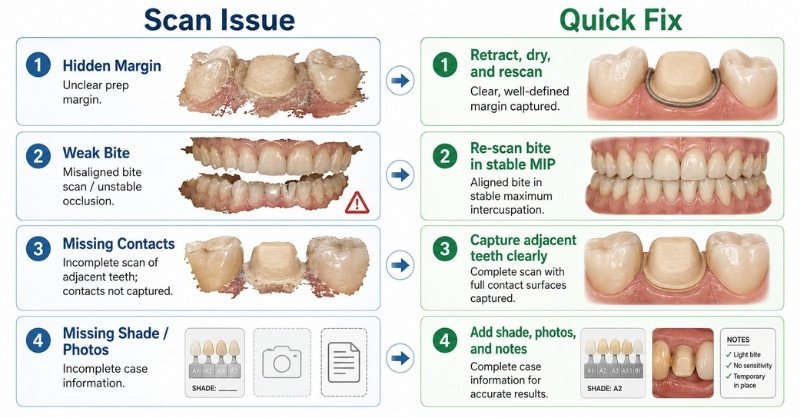
Crown case delays usually happen when the lab cannot clearly read the preparation or case instructions. The most common problems include hidden margins, incomplete adjacent teeth, weak bite scans, insufficient reduction, missing shade details, and unclear file submissions. Most of these issues can be corrected before the patient leaves by reviewing the scan and completing the notes.
Problem | What the Lab Sees | Quick Fix |
|---|---|---|
Margin is hidden | Finish line cannot be traced confidently | Improve retraction, dry the field, rescan margin area |
Not enough reduction | Crown design may become too thin or over-contoured | Check clearance before final scan |
Missing adjacent contacts | Contact design becomes less predictable | Capture mesial and distal contact surfaces clearly |
Weak bite scan | Occlusion may not match the patient’s bite | Re-scan bite in stable MIP |
Missing shade/photos | Esthetic guesswork increases | Add shade, stump shade, and clinical photos |
Generic STL files | Lab may need clarification | Label files clearly and complete notes |
The goal is not perfection for its own sake. The goal is a crown case the lab can start without stopping.
Florida and U.S. Dentists: Why Local Digital Lab Communication Still Matters
Even with digital scans, dentists still need a lab that can review cases quickly, communicate clearly, and understand the details behind fast restorative work. For Florida dentists, working with a Royal Palm Beach-based digital dental lab can make case coordination easier, while dentists across the United States can submit crown cases digitally without traditional impression shipping delays.
Digital dentistry makes distance less of a barrier, but the lab relationship still matters. The goal is simple: send the scan, get the case reviewed, and move forward with dependable restorative solutions for crowns, bridges, implants, and full-arch cases.
When Should You Rescan Before Sending?
Rescan before sending when the margin is not fully visible, the bite looks shifted, adjacent contacts are missing, the scan has holes near the preparation, or the reduction appears questionable. It is better to spend two minutes rescanning during the appointment than to receive a lab message later asking for clarification or a new scan.
Rescan before submitting if:
- You would not prep from that margin clinically
- The finish line disappears under tissue
- The scan has gaps near the prep
- The opposing arch is incomplete
- The bite alignment looks strange
- The shade/photo information is not enough for the case
- The STL files are incomplete or mislabeled
A quick rescan is not a failure. It is quality control.
Ready to Send a Crown Case?
Send your digital crown scan, shade details, and case notes to Palm Beach Dental Lab.
Frequently Asked Questions About Digital Crown Scan Submission
Check that the crown margin is clear, the full preparation is captured, adjacent teeth are complete, the opposing arch is scanned, the bite scan is accurate, and shade/case notes are included.
Labs usually delay cases because of unclear margins, missing bite scans, incomplete adjacent teeth, saliva or blood distortion, missing shade information, or incomplete case instructions.
It is not recommended. If the margin is unclear, the crown may not fit properly, and the lab may request a new scan or clarification before starting the case.
Yes, shade photos are very helpful, especially for anterior crowns and esthetic cases. Include clear photos with a shade tab and any special characterization notes.
Include the tooth number, restoration type, material, shade, due date, occlusion notes, margin notes, and any special instructions for the lab.
Conclusion
Dentists can submit digital crown cases to Palm Beach Dental Lab through iTero or other supported digital scanner workflows. For iTero submissions, use iTero Lab ID: 130219. For TRIOS, Medit, DEXIS, CS Connect, and other supported platforms, use palmbeachsmiledesign@gmail.com to connect or send case details. Before submitting, make sure the case includes the preparation scan, opposing arch, bite scan, tooth number, material selection, shade details, photos, and any special notes.

Bio
A clean crown case starts with clear details, accurate scans, and strong lab communication. Vijay Patel, Owner and Dental Technician at Palm Beach Dental Lab, works with dentists on crowns, bridges, implants, removables, full arch cases, and digital restorative workflows. He focuses on helping dental practices reduce delays, remakes, and back-and-forth by submitting complete case records from the start.